使い方 / Help
画面の構成
詳細画面は「概要」欄と「詳細」欄で構成されています。
「概要」欄
多くの地図は、1つの地図セットの中に複数のシートがまとめられています。「概要」欄では、1つの地図セットとしての情報を掲載しています。
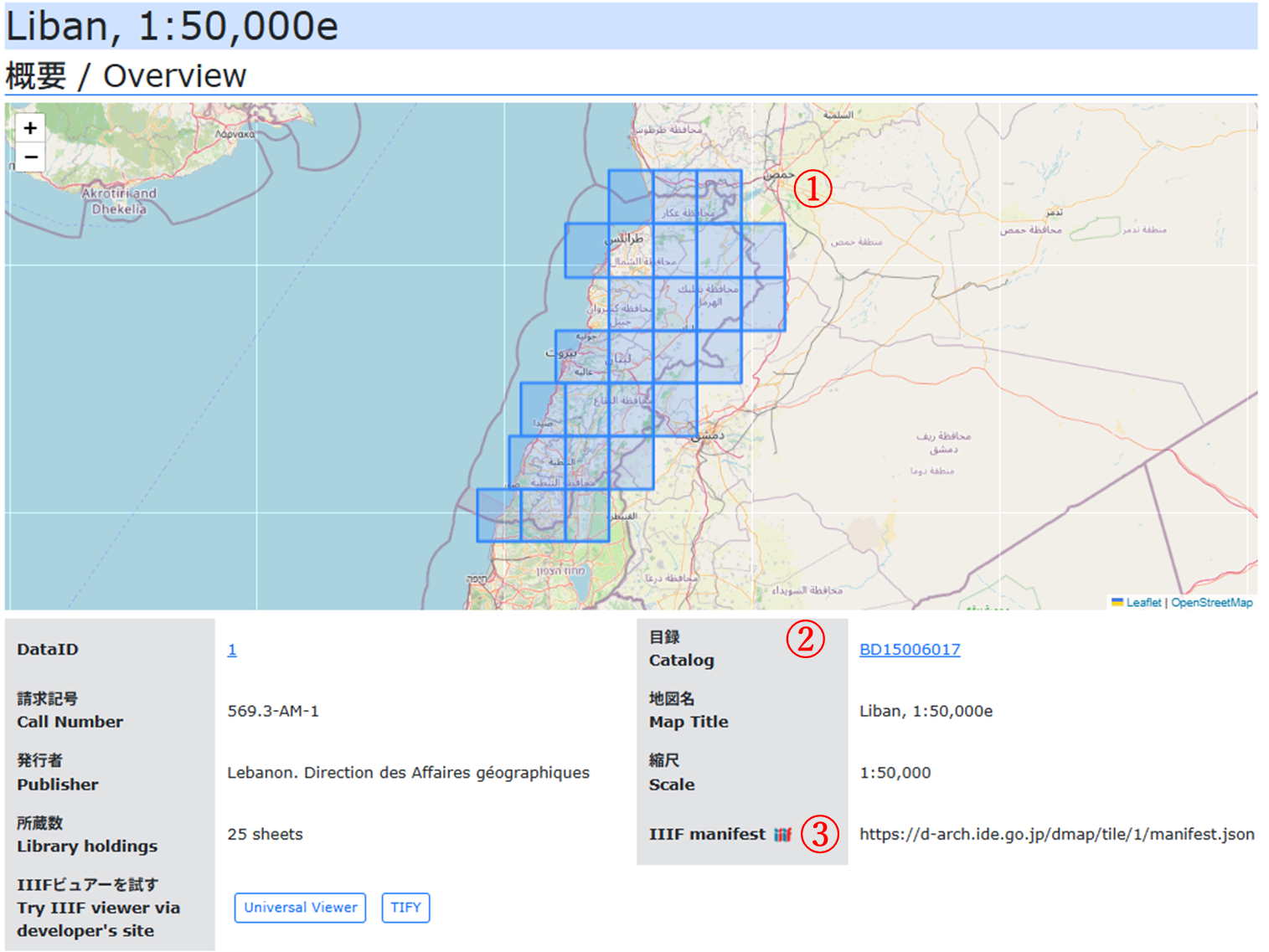
- ①世界地図の中で、本DBで公開している地図画像の位置を確認することができます。地図は拡大・縮小(マウスホイール)、表示位置の変更(ドラッグ)がマウス操作でできます。□をクリックすると、その地図の詳細情報へ移動します。
- ②この地図の詳細なメタデータをCiNii Booksで確認できます。
- ③任意のIIIF(International Image Interoperability Framework)画像ビュアーでこの地図セットを閲覧することができます。利用したいビュアーに、このURLを登録してください。
「詳細」欄
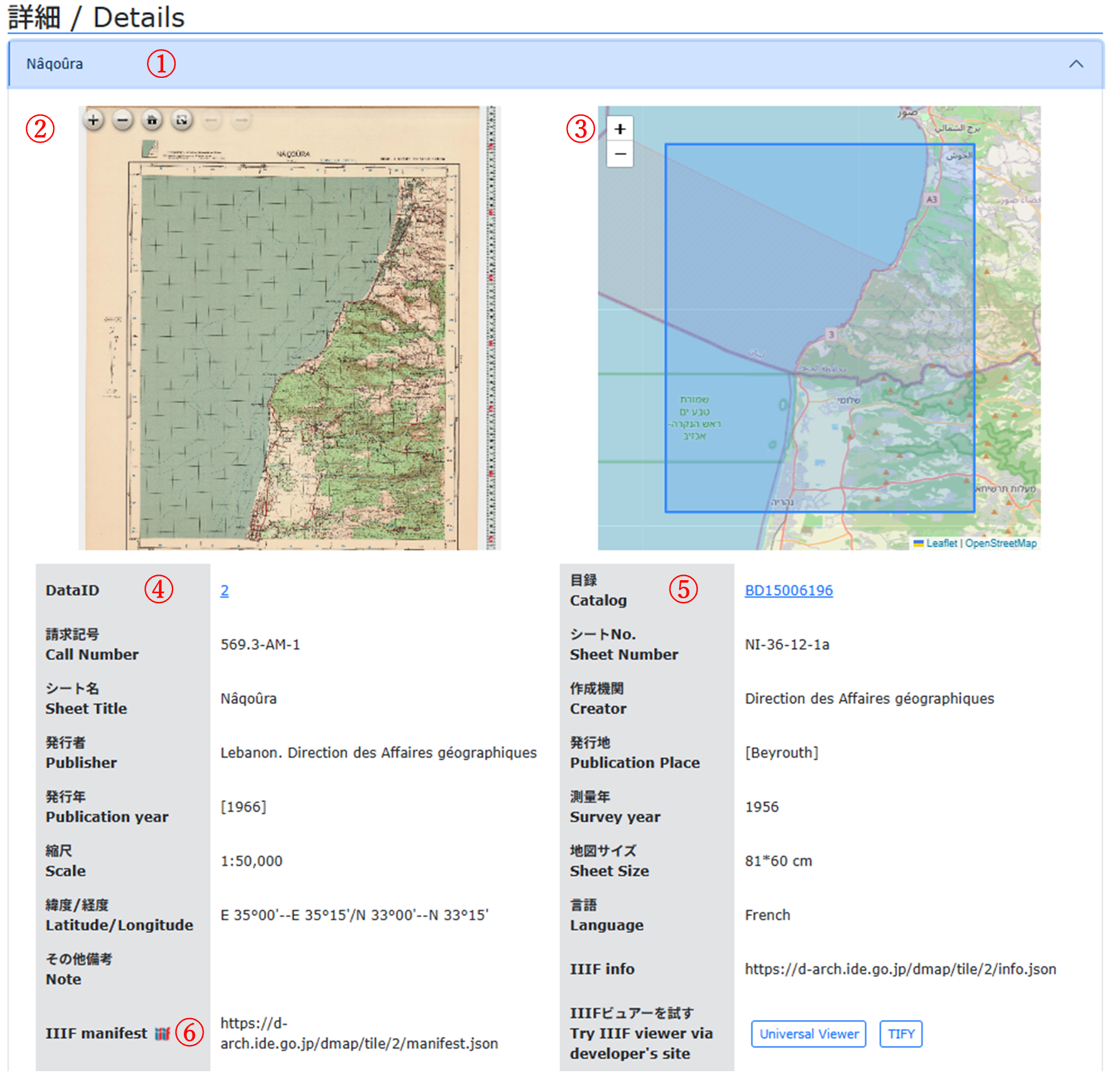
- ①詳細欄には地図のシート名のリストのみが表示されています。地図名をクリックすると詳細情報が表示されます。また、再度クリックすることで非表示にできます。
- ②地図画像が表示されます。拡大・縮小(マウスホイール)、表示位置の変更(ドラッグ)がマウス操作でできます。全画面表示や初期位置に戻すボタンがあります。
- ③地図画像と同じ位置の世界地図が表示されます。拡大・縮小(マウスホイール)、表示位置の変更(ドラッグ)がマウス操作でできます。大まかな緯度経度情報に基づくものであり、地図画像と完全に一致するものではない点にご留意ください。
- ④DataIDをクリックした際にウェブブラウザのアドレスバーに表示されるURLは、この地図を一意に特定するURLです。このURLを新しいウインドウ(タブ)で開くと、この地図の詳細情報を表示するようにwebページが開きます。
- ⑤この地図の詳細なメタデータをCiNii Booksで確認できます。
- ⑥任意のIIIF画像ビュアーでこの地図を閲覧することができます。利用したいビュアーに、このURLを登録してください。
その他の機能
本DBはレスポンシブ対応です。webブラウザの画面サイズに応じて表示が最適化されます。また、ダーク表示モード対応です。画面最下部の「Color Mode Switch」で変更できます。また初期表示はブラウザの設定依存です。
Detail Page Structure
The detail page is composed of an "Overview" section and a "Details" section.
"Overview" Section
Many maps consist of multiple sheets. The "Overview" section provides information about each map set as a whole.
- ①Within a world map, you can check the location of map images published in this database. You can zoom in/out (using the mouse wheel) and change the display position (by dragging) with mouse operations. By clicking the square, you can navigate to the detailed section of that sheet.
- ②You can view detailed metadata for this map in CiNii Books.
- ③You can browse this map using any IIIF (International Image Interoperability Framework) image viewer. Please register this URL in the viewer you wish to use.
"Details" Section
- ①The Details section displays only a list of the map sheet names. Clicking a map name will display its detailed information.Clicking it again will hide the information.
- ②The map image is displayed. You can zoom in/out (mouse wheel) and move the display position (dragging). There are buttons for full-screen display and returning to the initial position.
- ③The world map showing the same location as the map sheet image is displayed.You can zoom and move it using mouse operations.Please note that this is based on approximate latitude and longitude information and may not perfectly match the map image.
- ④When clicking the DataID, the URL shown in the web browser's address bar uniquely identifies this sheet. Opening this URL in a new window (tab) will display the detailed information for this sheet.
- ⑤You can view detailed metadata for this sheet in CiNii Books.
- ⑥You can browse this sheet using any IIIF image viewer. Please register this URL in the viewer you wish to use.
Other Features
This database supports responsive design.The display is optimized according to the web browser's screen size. It also supports a dark mode display. You can switch modes using the "Color Mode Switch" at the bottom of the screen. The default display depends on your browser settings.